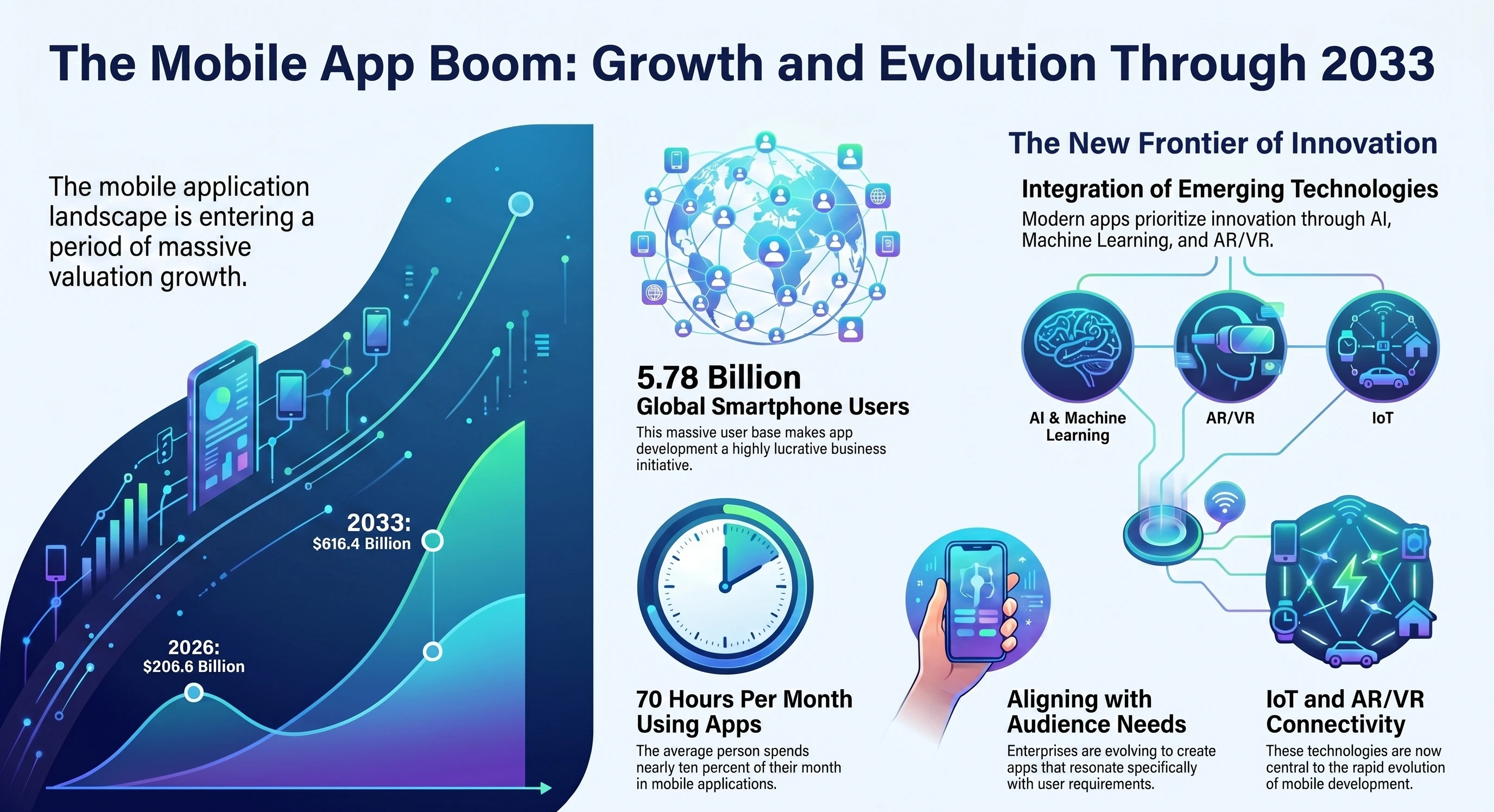
With over 5.78 billion smartphone users globally, mobile app development is undoubtedly one of the most lucrative initiatives for businesses. As per research, an average person spends 70 hours per month using mobile apps. That said, the mobile application development landscape has changed rapidly over the past decade. Enterprises are nowadays focusing on developing apps that resonate with their audiences and align with their actual needs, while also innovating them with emerging technologies such as AI, ML, AR/VR, and IoT.
Although while being lucrative, the app development process is not without challenges. And these challenges stand tall when you lack the basics. However, to every problem, there is a solution, but it works only when you work with the experts.
To help you with a better understanding, we will talk about the top mobile app development challenges that come along, while also suggesting viable solutions to overcome them.
Biggest Challenges in Mobile App Development Lifecycle
The market valuation for mobile app development is at $206.6 billion in 2026 and is expected to reach $616.4 billion by 2033. While this massive valuation presents a lucrative future for businesses, the challenges come along the way.
Here we have listed a few mobile app development challenges:
1) Platform Fragmentation and Device Diversity
A perfect mobile app is one that works seamlessly and smoothly across all devices and platforms. See if we consider Android, the diversity is so massive that the OS controls 73% of the entire market share. There are millions of devices with different screen sizes and chipsets running with different memory capacities and OS versions. The performance consistency across these different devices is a super challenge in the entire mobile app development process.
Likewise, iOS has strict guidelines for app companies. They need to follow certain performance, behavioural, and appearance guidelines. While publishing the app on the App Store, Apple ensures all the technical and other requirements are fulfilled. If not, it may get rejected.
Solution
You can use a cross-platform framework like Flutter or React Native, as this eliminates duplicate code and makes the development simpler. Additionally, testing tools like Firebase Test Lab help automate the testing and ensure that the app works smoothly on all devices.
2) Choosing the Right Development Approach
Before starting the development, it is a must for companies to choose the best approach for their project. The main decision includes choosing between native development and cross-platform development. No matter what you choose, each approach has its pros and cons.
It is undoubtedly a fact that native applications deliver better performance, but they are super demanding in terms of cost, time and effort. Hiring extra developers adds to the overall project cost.
Meanwhile, cross-platform development is cost-effective and aims to launch the app much faster. But that too comes with a cost. The app may not deliver native like performance, advanced graphics and real-time processing.
Solution
Native development is best for developing the apps that demand super performance, including high-end games, AR/VR apps, etc. But when faster development and easy maintenance are the goal, there is no better option than cross-platform app development.
3) Maintaining a Consistent User Experience
User expectations are always fragile, and with a new trend, it changes overnight. However, one thing remains constant, and that is their expectation for smoother performance. When apps are made simple and performance-centric, the chances of their adoption increase. But when it lags in performance across devices, it poses a challenge for businesses, as there might be a sharp decrease in downloads.
Apart from these challenges, many businesses are stuck on which features they should include and what not. A common mistake every other company makes is overloading the app with too many features, which may confuse users instead of giving them value. This confusion leads to frustration, uninstallation, or even switching to other alternatives.
Solution
In order to make sure the platform has a uniform user experience, developers and companies should follow a standardized design system, such as:
- Material Design: This provides guidelines for colours, layouts, icons and animations. Using these guidelines, developers can design advanced yet simple apps that perform uniformly across diverse Android devices.
- Apple Human Interface Guidelines: These are Apple’s specific guidelines for designers on how apps should work and appear on different Apple device screens. The goal remains focused on navigation and clean vsiuals fr smooth interactions.
The best way to validate an app idea is to create a basic version (MVP) and test it with real users. Then, based on user feedback, improve and iterate to make it more aligned with what users actually need.
4) Battery and Resource Usage Management
A mobile app runs because of useful features and eye-catching visuals. But the biggest challenge in the mobile app development process remains enhancing these elements without compromising battery performance. The main features of a typical mobile application include
- Real-time updates
- Location tracking
- Frequent network calls
However, poor optimization of these features may lead to speedy battery drainage. This may also ruin the customer experience and result in frequent uninstallations. Despite these valuable features, excessive battery usage may trigger users to abandon the app.
Solution
This issue must be addressed during the application development stage. Developers need to ensure that the app doesn’t run excessively in the background. Even if it does, there must be crucial reasons behind it. There are two effective ways to reduce battery and resource usage:
- Minimizing the network requests
- The app must receive or send data online.
On top of that, make sure the app goes through rigorous testing that ensures optimized battery usage before rolling out. Use Xcode's Energy Diagnostics for iOS and Android Studio's Battery Profiler for Android to identify features or processes that consume excessive battery power and make necessary tweaks to the app.
5) Performance Optimization Across Devices
Nowadays, people's demands for good apps go beyond just having good features; they now need apps with advanced features and top-notch performance. If the app takes ages to load, there are sure chances that the user will stop using it. Today, app stores have millions of apps, which means users have no dearth of choices. Even a small inconvenience pushes users to switch to alternative apps. Smooth interactions, fast performance and fast loading are no longer special but have become the new normal.
Most users who face such issues are the ones using the basic or mid-range smartphones. The problem isn’t with the app but with the phone, as they have limited memory and a slower processor. Hence, developers should point out this issue and optimize the app so that it doesn’t crash or lag during busy times.
Solution
Larger images in your application may affect the phone's performance abd increases its loading time. It's better to use smaller or compressed images. There should be lazy loading, meaning content should load only when necessary instead of automatically loading. Meanwhile, developers should use tools like Sentry to track app crashes and lags with the reasons for timely resolution.
6) Complex Testing Requirements
Compared to websites, mobile application testing is comparably more challenging. That is because mobile apps operate on a variety of devices and operating systems. Even with Android OS, there are thousands of screen and device variations. This may include the following:
- Processors
- RAM and Storage
- Screen Size and Display
- Sensors and Hardware
- Operating System Versions
A function that works fine on a particular phone may not operate as well on another. Developers should check the app’s performance under different conditions. This includes slow internet or no connectivity. Even after testing, there might be issues that can be reported on different models or older operating systems.
Solution
Developers should use combine approach of automated and manual testing. It saves companies the trouble of checking every feature manually. Faster bug identification ensures a smoother app performance. Developers should use cloud device platforms like BrowserStack to test apps on real smartphones and OS for proper functionality.
7) Third-Party API and SDK Integration
Most of the apps depend on integrations to make crucial features work, such as payments, user login, analytics tracking and cloud data storage. Building such systems from scratch requires considerable time and effort. Therefore, it is easier to integrate third-party platforms, like
- Stripe/PayPal - For Payments
- Google Analytics - For usage tracking
- Firebase - For backend services
These pre-built integrations can speed up the development and remove the excessive dependency on developers. However, service providers may change their API or release a new update, which may result in downtime. When such things happen, company operations are the most affected. Users may have issues with payments and checkouts. Companies must monitor these integrations regularly and update the app whenever third-party platforms make any changes.
Solution
Integrating third-party services into mobile apps can be risky. Even a slight change in API can lead to code corruption. This may also result in bugs. Developers should use abstraction layers and use monitoring tools to track the performance of such integrations. If a particular feature is not working properly, get to the root of the problem and take necessary steps to fix it.
8) App Store Competition and Discoverability
Every day, millions of apps are published on app stores. With so many apps, it is challenging for businesses to get noticed. A luring design and latest features integrations aren’t enough; the app must appear in search results or app store recommendations.
The visibility of apps in app stores depends on factors such as
- Search Keywords
- App Descriptions
- App Ratings
- User Reviews
- Screenshots
Apps with positive and high ratings will jump to higher spots. This increases the chances of app discoverability. Without App Store Optimization (ASO), finding an app remains challenging for users, even with the exact name.
Solution
Improve your app’s search visibility with solid strategies like App Store Optimization (ASO). It includes optimizing the titles, descriptions and keywords. These help increase the visibility and downloads of the app.
9) Hidden Development and Maintenance Costs
Most businesses think developing an app is a one-time cost, but that is not true. The initial app development cost covers only the build work. After completing, the app needs new improvements and integrations. Additionally, fine-tuning and testing require additional cost. Even after the app launch, the expenses don’t stop. Businesses need to update the app regularly. Regular bug fixes and ensuring optimal app performance require extra efforts and resources. Besides these, the hidden cost include
- Ongoing costs for servers
- Security updates
- Monitoring app performance
Solution
Before starting the development process, businesses should decide on the main features and functionalities. Adding more features or integrations later adds to the overall cost and impacts the project deadlines. Additionally, businesses should allocate extra budget for bug fixing, updates, and app improvements.
10) Post-Launch Updates and OS Changes
Operating systems release continuous updates. This helps improve the performance and keep the app secure. But sometimes these updates do more harm than good. After the update, sometimes, apps may stop working or act weirdly. This usually happens when the OS alter or removes certain PAIs. Testing may detect the issue, but it can’t prepare developers for real-life usage.
Every user interacts with the app in their own way, and user behaviour provides insights into performance or hidden bugs. Developers can use these insights to fix the issues. This helps improve the performance and keep the app functional.
Solution
The best way to manage maintenance and updates is to use an agile cycle. This approach allows developers to work in short spurts. As soon as the new update is released, the developers start fixing the issues. With continuous feedback, they can get valuable insights, which allow them to find the root cause of the issue and release quick fixes accordingly.
Conclusion
The mobile app development process is itself challenging and rewarding as well. Once you overcome these challenges, there will be no one stopping your app from being successful.
However, this needs strategic and expert insights right from the start and, of course, an app development partner like Mtoag Technologies to guide the process.
With the right guidance and execution in place, building a successful mobile app becomes less about uncertainty and more about making the right moves at the right time.