Gone are the days when going somewhere felt like a task in itself, stopping at corner shops to ask for directions, guessing routes, and often ending up stuck in traffic. But ever since Google Maps launched, the navigation has undoubtedly become effortless. You will be surprised to know that the active monthly user count for the service surpasses 2 billion, roughly 770 people using Google Maps every second. But have you ever wondered: How does Google Maps actually work? How does it predict traffic so accurately? How does it choose the best route in real time? If not, it's time to pay attention.
Well! It’s basically not rocket science, but the intelligent use of technology, algorithms, patterns and of course the integration of artificial intelligence in recent years. Following the success of Google Maps, many online navigation services like Apple Maps have also emerged, but the popularity and adoption that Google Maps has achieved remain nearly unmatched.
Once you understand how Google Maps works, you will likely question how you have been using the service till now. Through this guide, we will explain the science behind Google Maps and the technology that powers it.
How Does Google Maps Work?
Google Maps uses a combination of satellite, aerial imagery, street-view photography, GPS data, users’ crowdsourced location data and advanced technologies such as AI and ML to create an interactive database that provides navigation, route insights and real-time traffic updates.
When you open Google Maps, the first thing you do is search for your specific location or browse the map to explore the area. At the same time, it also shows places of interest nearby, such as businesses, landmarks and other information.
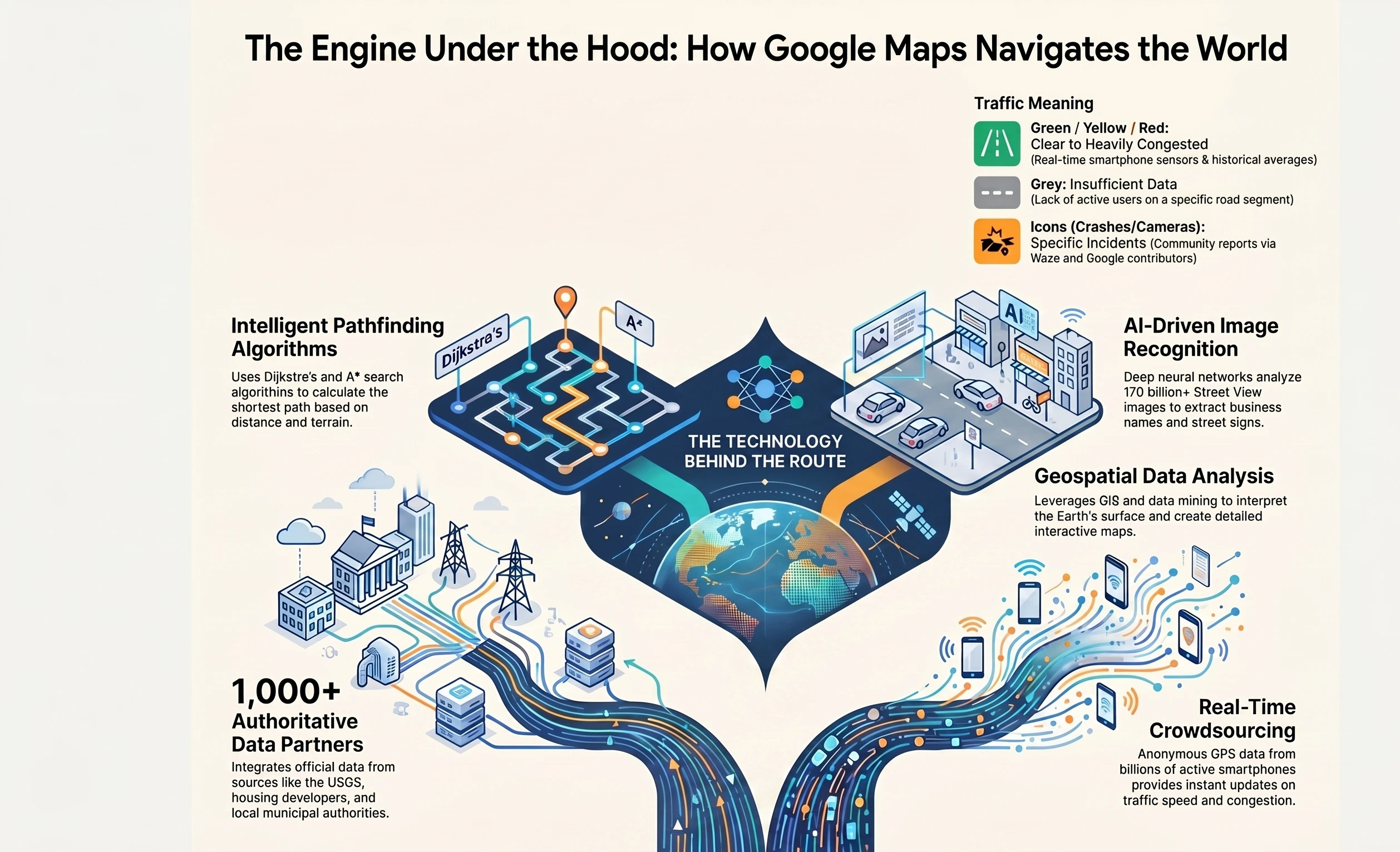
To be this accurate and updated, Google use a variety of technologies and algorithms in the backend that mainly include:
Image Recognition Technology
While using Google Maps, you might have definitely searched for your house. Although the image might be blurred, it shows exactly how it is. For this, Google uses image recognition algorithms to extract the information from satellites. These algorithms recognize objects, such as roads, buildings, grounds, and landmarks. And using this information, the algorithm creates a detailed map of the area.
Machine Learning
Google Maps uses artificial intelligence and machine learning algorithms to analyze and interpret the data from different sources, like street view photos, satellite imagery and data sourced from the user. These algorithms together identify the regular patterns and predict trends, following which Google Maps provide accurate and updated information about directions and locations.
Geospatial Data Analysis
Maps primarily leverage geospatial data analysis algorithms to analyze the Earth’s surface. After that, interpret it to extract the useful information from large datasets of geospatial data. The analysis includes the use of advanced techniques like geospatial data mining and geographic information systems (GIS). Altogether, these techniques create the essential part of the backend of Google Maps.
Path Finding Algorithms
Google Maps uses Dijkstra's and A* search algorithms for finding the shortest path between two points. Dijkstra's algorithm helps find the shortest possible path between two nodes in a graph. Starting from the source node and progressively exploring the graph, it adds nodes as it goes.
Whereas A* search algorithms find the shortest path between two points. It combines the intelligence of Dijkstra's with a heuristic function that guides towards destination nodes. The specific algorithms used may vary with the specifics, such as distance, number of turns and the type of terrain.
Where Does Google Maps Get Its Data?
Google Maps continues to make its data as accurate and up-to-date as possible. But how does Google get that data from? As said earlier, the data for Google Maps is primarily contributed from satellite imagery, third-party, machine learning and community contributors.
Let’s understand them briefly:
Imagery
Right after Google Maps were launched, the platform also launched Street View, which is a virtual representation of our area, consisting of millions of panoramic images. With high-quality imagery data sets, the Google Maps team also allows businesses to provide real-world context in their applications. So, street view on Google Maps became the essential basis for the mapping process.
In over 85 countries, over 170 billion street view images allow for extraction. A deep neural network, it helps accurately read the street names. Apart from this, using machine learning, the platform allows to extract other crucial information, such as business names from storefronts.
Third-party Authoritative Data
Apart from satellite imagery, Google Maps sources its data from over 1000 third -party authoritative sources worldwide. They mainly include housing developers, the United States Geological Survey, local, regional, and national authorities, local, regional, and national authorities, or organizations using Google APIs.
For example, Google Maps helps drivers of the USA’s ride-sharing companies, such as Lyft and mytaxi, find the fastest route with traffic-aware routing. The easy sharing between Google Maps and its partners keeps everything updated so that customers can accurately search, explore and navigate.
Machine Learning
The Google Maps team have turned to technologies to save extra manual efforts and make it more accurate and efficient. The machine learning technologies help save the worker’s resources, make the data more presentable and faster and maintain the accuracy.
Here’s an example of Google Maps using ML to accurately provide the services. Machine Learning models constantly analyze real-time traffic patterns, historical data and user-submitted updates to predict the route traffic. The system alternatively suggests a faster route.
Community Contributors
Last but not least, Google Maps uses community contributions to keep the data up-to-date. These include customers, businesses and users who contribute to Google Maps accuracy.
The platform provides different channels for people to update Maps data or change map markers. Users can use Send Feedback (desktop maps) or Suggest Edit tools. For enterprises using the Maps solutions, they can report bad points through the API. Additionally, businesses and agencies can update their information through the Google My Business platform.
How Does Google Maps Know There’s a Traffic Jam?
The green, yellow and red routes on Google Maps basically indicate clear, slowing-moving, or heavily congested traffic. It is actually the best way to determine the fastest way to your destination, but how does Google know there’s a traffic jam or a clear route?
Google Maps uses two different pieces of information for its traffic views and faster route recommendations, and they are historical data of the average time it takes to travel from a particular road at specific times on specific days. Second is real-time data sent by sensors and smartphones that reports how fast or slow the vehicles are moving right then.
Earlier versions of Maps relied on data from traffic sensors only, which were installed by private companies that compiled traffic data or government transportation agencies. Using the radars, or active infrared technologies, these sensors detect the speed and size of the passing vehicles and then transmit this information to a server.
Data from these servers is used to provide real-time traffic updates. Once collected, this information is stored as the pool of historical data used to predict traffic volumes on future dates. However, this data is largely limited to highways and big routes because these sensors are usually uninstalled on the most heavily traffic-prone roads.
At the same time, Google also uses crowdsourcing to improve the accuracy of traffic predictions. Whenever a phone user turns on their Google Maps app with GPS enabled, the phone sends the data to Google anonymously to let them know how fast the vehicle is moving. The platform combines the data from all the vehicles and sends it back by way of those Green, Yellow and Red lines on traffic layers.
With drivers using the platform more often, the traffic predictions have become more reliable than ever. As said earlier, Google Maps records the average speed of the car travelling along the same route. In case Google Maps doesn’t have enough traffic data for a particular section of the road, it shows that section in grey on the traffic layer.
With the acquisition of Waze, Google added crowdsourcing elements to its traffic contributions. Drivers using Waze apps can report incidents like accidents, disabled vehicles, speed traps and even slowdowns. These real-time reports appear as people points on Google Maps with elements like construction signs, crashed cars or even speed cameras.
Is It Profitable to Build an App Like Google Maps?
In our exploration of Google Maps advanced features, we have uncovered the transformative and business-centric capabilities of such navigation apps. The popularity of Google Maps and Apple Maps are evident of the fact that this initiative can be.
Wondering how to build an app like Google Maps or to integrate it into your app? We, at Mtaog Technologies, can help you build an interactive, modern map experience for your customers. Apart from development, we also specialize in integrating Google Maps into your existing systems. You can contact us for
- Customization;
- Development;
- Integration;
- Training;
- License;
- Support.
We can guide you on how to integrate Maps for better system interoperability, optimize cloud infrastructure and build your Google Maps-like apps.
Conclusion
As we conclude this guide, we are sure that you have got good information about how Google Maps works. The technologies, algorithms, third-party data and community contributors altogether make it work accurately and efficiently.
At the same time, the proliferation of artificial intelligence and machine learning has enhanced the platform’s capabilities while elevating the consumer side. As we are heading towards a more futuristic world, the Google Maps services will make navigation smarter, faster, and more personalized than ever before.
FAQs
What is Google Offline Maps?
Google Offline Maps is a feature in Google Maps that allows users to download specific areas and access them without an internet connection. Once downloaded, users can still search locations, get directions, and navigate within that saved region. It is especially useful while travelling in areas with weak or no network connectivity, helping ensure uninterrupted navigation.
How do I Use a Live View on Google Maps?
Live View in Google Maps uses augmented reality to provide real-time, camera-based navigation. To use it, simply search for a destination, tap on directions, and select the “Live View” option while walking. The phone’s camera will display arrows and directions over real-world surroundings, making it easier to follow routes, especially in complex or unfamiliar areas.
Is the Google Maps App Free?
Yes, Google Maps is completely free for users to download and use on both Android and iOS devices. There are no subscription charges for accessing navigation, directions, or map features. However, it does require internet data for most functionalities, and standard data charges from the mobile network provider may apply while using it.
What is the Math Behind Google Maps?
Google Maps relies heavily on mathematical concepts such as graph theory, algorithms, and geometry. It uses shortest path algorithms like Dijkstra’s algorithm to calculate the fastest routes. Distance calculations, real-time traffic predictions, and location accuracy all depend on complex mathematical models working continuously behind the scenes to deliver precise results.
Is It Possible to Use Google Maps Without the Internet?
Yes, it is possible to use Google Maps without the internet, but with some limitations. By downloading offline maps in advance, users can still navigate, view routes, and explore saved areas. However, features like real-time traffic updates, live rerouting, and location sharing will not function without an active internet connection.